

The typical lifespan of a cordless rechargeable vacuum cleaner is 3 to 7 years, depending on build quality, usage frequency, battery care, and maintenance habits. Entry-level models used daily in a busy household often last 3 to 4 years before motor wear or battery degradation makes replacement more cost-effective than repair. Mid-range and commercial-grade models, when properly maintained, regularly achieve 5 to 7 years of reliable service. The single most common reason cordless vacuums are retired early is not motor failure — it is battery capacity degradation, which reduces runtime to a point where the vacuum can no longer complete a cleaning session without recharging.
Understanding what drives lifespan — and what shortens it — gives owners practical tools to extend their vacuum's useful life significantly beyond the average, while also helping buyers make smarter purchasing decisions from the outset.
Content
In corded vacuums, the motor is the primary limiting component. In cordless rechargeable vacuums, the lithium-ion battery pack takes on that role. Battery capacity directly determines how long the vacuum can run per charge, and as the battery ages, that runtime shrinks progressively.
Lithium-ion batteries degrade with each charge-discharge cycle. The rate of degradation follows a predictable curve:
The practical implication is straightforward: the battery, not the motor, determines when most cordless vacuums are retired. A vacuum that runs 60 minutes when new but only 15 minutes after four years has not worn out mechanically — it has exhausted its battery's useful capacity.
For models where replacement batteries are available and reasonably priced, swapping the battery pack when capacity becomes problematic can restore the vacuum to near-original performance and extend its useful life by an additional 3 to 5 years. Replacement battery packs typically cost between $25 and $80 depending on the model and battery capacity, which is substantially less than purchasing a new unit.
The critical caveat is availability: models that use proprietary battery formats and are discontinued by the manufacturer may have no replacement batteries on the market, making the vacuum effectively disposable once the battery degrades. Before purchasing any cordless vacuum, verify that replacement batteries are available separately and note their current retail price.
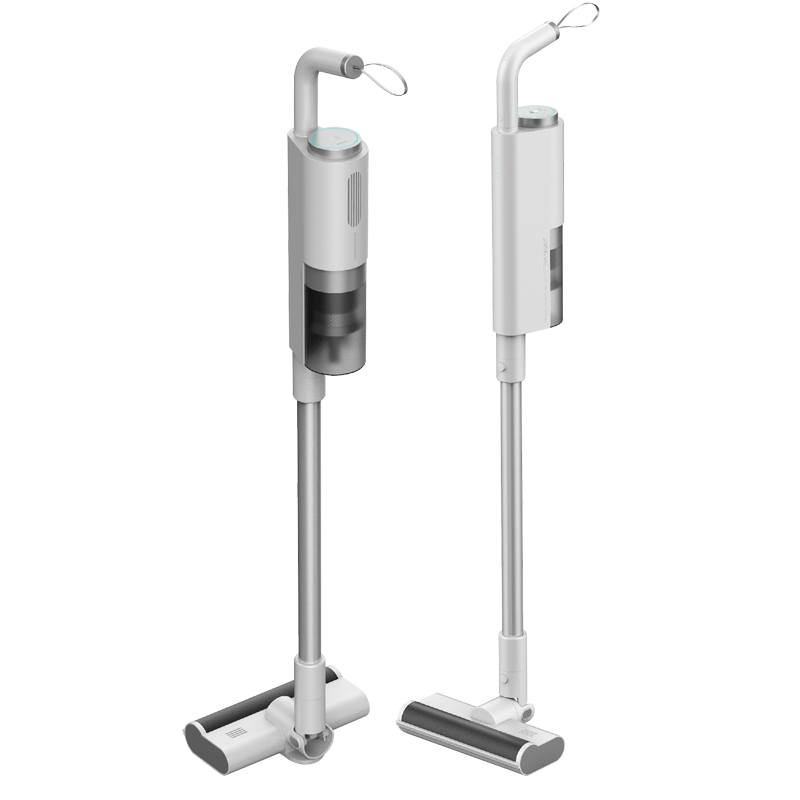
Not all cordless rechargeable vacuums are engineered to the same durability standard, and not all usage patterns place the same demands on the hardware. The following table provides realistic lifespan ranges by vacuum category and usage intensity:
| Vacuum Category | Light Use (2–3x/week) | Regular Use (Daily) | Heavy/Commercial Use | Primary Failure Point |
|---|---|---|---|---|
| Entry-level handheld | 3–5 years | 2–3 years | 1–2 years | Battery degradation |
| Mid-range stick vacuum | 5–7 years | 4–6 years | 2–4 years | Battery or brush roll motor |
| High-performance stick vacuum | 7–10 years | 5–8 years | 3–5 years | Battery (replaceable) |
| Commercial-grade cordless | 8–12 years | 5–8 years | 3–6 years | Battery (swappable packs) |
| Compact car/spot cleaner | 4–6 years | 2–4 years | 1–2 years | Battery or motor bearing |
Commercial-grade cordless vacuums are engineered with reinforced motor housings, industrial-grade bearings, and swappable battery systems specifically because they are expected to operate for multiple sessions per day across months and years of continuous use. A lightweight compact model weighing around 6 lbs (approximately 2.7 kg) designed for commercial environments is built to a fundamentally different durability standard than a consumer handheld, even if their outward appearance is similar.
Lifespan is not fixed at the point of manufacture — it is actively shaped by how the vacuum is used, charged, stored, and maintained. The following six factors have the greatest measurable impact on how long a cordless rechargeable vacuum remains in reliable service.
Charging behavior is the single most controllable factor in battery longevity. Lithium-ion batteries degrade fastest when subjected to repeated full discharges or left at 100% charge for extended periods. The optimal storage charge level for long-term battery health is 40–60%, and the healthiest operational range for daily use is 20–80%.
In practice, many users keep their cordless vacuum on the charging dock continuously — which means the battery remains at 100% charge whenever the vacuum is not in use. While modern battery management systems in quality vacuums include overcharge protection, continuous storage at full charge still accelerates capacity loss compared to charging only when needed. Removing the vacuum from the dock once fully charged, or using it periodically before recharging, extends battery cycle life measurably.
A clogged or dirty filter forces the vacuum's motor to work significantly harder to pull air through the restricted airflow path. This increased load elevates motor operating temperature and accelerates wear on motor bearings and windings. Studies of small appliance motor failures consistently identify sustained operation under restricted airflow as a leading cause of premature motor failure.
Most manufacturers recommend cleaning the filter every 1 to 4 weeks depending on usage intensity, and replacing it every 6 to 12 months. Vacuums with washable, removable filters — designed for easy cleaning — make it practical to maintain this schedule consistently. Allowing the filter to remain clogged for months at a time can reduce motor lifespan by 30–50% compared to a well-maintained unit.
Hair, thread, and fibrous debris accumulate around the brush roll during normal use. When this accumulation reaches the brush roll's end caps or bearings, it creates friction that strains the brush roll motor. In models where the brush roll motor is a separate unit from the main suction motor, brush roll motor failure is a common secondary cause of reduced vacuum performance and, in some cases, complete failure.
Removing accumulated hair from the brush roll after every 3 to 5 uses — using scissors to cut wrapped strands before pulling them free — takes less than two minutes and prevents progressive damage to both the brush roll bearings and the motor. Vacuums with easy-access brush roll compartments make this task significantly more convenient.
Lithium-ion batteries are sensitive to temperature extremes. Storage in environments consistently above 35°C (95°F) — such as garages, attics, or cars in summer climates — accelerates chemical degradation inside the battery cells and can reduce total battery lifespan by 20–40% compared to storage at room temperature. Storage in freezing conditions also reduces battery performance, though the effect is more reversible than heat damage.
The ideal storage environment for a cordless vacuum is a climate-controlled interior space at temperatures between 15°C and 25°C (59°F to 77°F). Wall-mounted charging docks in a hallway, utility room, or kitchen meet this criterion for most homes.
A full dustbin reduces the effective airflow path through the vacuum, creating the same restricted-flow conditions as a clogged filter. Running the vacuum with a full or near-full dustbin stresses the motor and reduces suction efficiency. Emptying the dustbin after every use, or when it reaches two-thirds capacity, maintains optimal airflow and reduces motor operating stress throughout the vacuum's lifespan.
Running a cordless vacuum on maximum suction at all times is one of the most common causes of accelerated wear. Maximum suction draws maximum current from the battery, generates the most heat in the motor, and depletes the battery at the fastest rate — all conditions that shorten both battery and motor lifespan. Using the standard or eco suction mode for routine hard floor and light debris cleaning, reserving the boost or max mode only for carpet deep-cleaning, reduces cumulative wear significantly without meaningfully compromising cleaning results on appropriate surfaces.
Models with adjustable suction controls provide owners with this flexibility, which is one reason vacuums featuring variable suction settings tend to have longer operational lifespans than single-speed models used at maximum output continuously.
A cordless rechargeable vacuum is a system of multiple components, each with its own wear rate and expected service life. Understanding which parts fail earliest — and in what sequence — helps owners anticipate maintenance needs and make informed decisions about repair versus replacement.
| Component | Typical Service Life | Common Failure Symptom | Repairable? | Approximate Replacement Cost |
|---|---|---|---|---|
| Battery pack | 2–5 years / 300–600 cycles | Reduced runtime, rapid discharge | Yes — if available | $25–$80 |
| Filter (foam/mesh) | 6–12 months | Reduced suction, odor on exhaust | Yes — routine replacement | $5–$20 |
| Brush roll | 2–4 years | Poor carpet pickup, visible bristle wear | Yes | $10–$35 |
| Brush roll motor | 3–6 years | Brush roll stops spinning, burning smell | Sometimes | $20–$60 |
| Main suction motor | 5–10 years | Loss of suction, unusual noise, overheating | Rarely cost-effective | $40–$120+ |
| Charging dock / cable | 3–7 years | Intermittent charging, no charge indicator | Yes | $10–$30 |
| Dustbin / housing | Lifetime of vacuum (with care) | Cracks, broken latch, poor seal | Sometimes | $15–$40 |
The sequence of component failure in most cordless vacuums follows a predictable pattern: filters require replacement first (within the first year), brush rolls and battery packs begin to show wear in years 2 through 4, and the main suction motor — which is a robust component in quality vacuums — typically outlasts the battery by a substantial margin. In the majority of cases, a cordless vacuum that "stops working" has a degraded battery or a blocked airflow path, not a failed motor.
Consistent maintenance is the most reliable way to extend a cordless vacuum's service life toward the upper end of its potential range. The following schedule applies to regular household use (cleaning 4–7 times per week):
Recognizing the early and late warning signs of a vacuum approaching the end of its useful life helps owners make timely decisions about repair, battery replacement, or replacement before a complete failure disrupts their household routine.
The decisions made at the point of purchase have a larger impact on total lifespan than any subsequent maintenance habits. A well-constructed vacuum maintained poorly will typically outlast a poorly constructed vacuum maintained perfectly. The following build quality indicators are associated with longer service life and should be evaluated before buying:
When a cordless vacuum develops a significant fault, the decision to repair or replace it is primarily a cost and longevity calculation. A useful rule of thumb in appliance repair is the 50% rule: if the total repair cost exceeds 50% of the cost of an equivalent replacement unit, replacement is generally more economical over a 5-year horizon. Apply this framework to the most common cordless vacuum repair scenarios:
The most cost-efficient approach to cordless vacuum ownership is to invest in a mid-range or higher-quality unit at purchase, maintain it consistently according to the schedule above, and replace consumable components — filters, brush rolls, and batteries — proactively rather than reactively. This approach regularly delivers service lives of 5 to 8 years from units that a poorly maintained owner might retire after 2 to 3 years.
Some modern cordless vacuums feature rapid-charge technology that can deliver a usable partial charge in as little as 6 minutes — sufficient for targeted cleaning tasks without waiting for a full recharge cycle. While this is a genuine convenience advantage, it is worth understanding how fast charging interacts with battery longevity.
Fast charging works by delivering higher current to the battery cells in the early portion of the charging cycle, before the battery management system throttles back to a slower trickle charge for the final stage of filling. This process generates more heat per charging cycle than conventional slow charging. Heat is the primary environmental cause of accelerated lithium-ion battery degradation.
In practical terms, using rapid charge for occasional top-ups before a quick cleaning task has minimal impact on battery lifespan. Using it as the primary charging method for every cycle — fully depleting the battery and then fast-charging it repeatedly — places more stress on the cells than standard charging and may reduce the battery's total cycle count by 10–20% compared to regular charging. Quality rapid-charge systems include thermal management to minimize this effect, but the trade-off remains relevant for users who prioritize maximum battery longevity.

@2020. CIXI XIATIAN ELECTRICAL APPLIANCES CO.,LTD. All rights reserved. Wholesale High-End Electric Fans Manufacturers

 English
 한국어
한국어