

A tower fan is better for cooling a room or open living space; a desk fan is better for personal, targeted airflow at a workstation. Neither is universally superior — tower fans distribute air more broadly and quietly across a larger area, while desk fans deliver stronger, more concentrated airflow directly to one person at close range. Choosing the right one requires matching the fan's characteristics to the specific environment, distance, and use pattern.
Content
| Criteria | Tower Fan | Desk Fan |
|---|---|---|
| Airflow coverage | Wide (full room circulation) | Narrow (personal / spot cooling) |
| Noise level | Lower (35–50 dB typical) | Moderate (40–60 dB typical) |
| Floor space required | Moderate (floor-standing unit) | Minimal (sits on desk or table) |
| Portability | Moderate (bulky to carry) | High (lightweight, compact) |
| Wind concentration | Diffuse (spread across height) | Concentrated (adjustable tilt) |
| Oscillation range | Up to 90–120 degrees horizontal | Up to 90 degrees horizontal |
| Safety (blade exposure) | Fully enclosed (bladeless or shrouded) | Guarded blades (some models use safe metal blades) |
| Typical power consumption | 35–60W | 15–35W |
Tower fans use a vertical column of intake openings and an internal centrifugal blower to draw air from the base and expel it through a tall, narrow outlet. This creates a broad vertical curtain of airflow rather than a concentrated stream — making tower fans effective at moving air throughout a room of up to 20–30 square meters without creating a direct wind blast on any one person. When set to oscillate, a tower fan can cover the full width of a living room or bedroom with minimal noise.
Tower fans operate at 35–50 decibels on low settings — comparable to a quiet conversation or soft background music. This makes them suitable for bedroom use during sleep, where the consistent white-noise effect of air movement can actually improve sleep quality without the disruptive blade chop characteristic of propeller-type fans.
Most tower fans have fully enclosed housing with no externally accessible rotating blades. The air intake and outlet slots are narrow enough to prevent finger or paw contact with internal components — a meaningful safety advantage in homes with young children or curious pets.
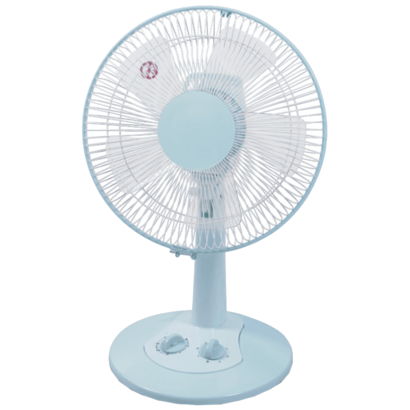
A desk fan positioned 30 to 60 cm from the user delivers substantially stronger, more directed airflow than a tower fan at the same distance. For someone working at a desk, studying, or doing detailed tasks, the ability to aim the fan precisely — using the tilt-head adjustment common on most desk fan models — provides more immediate cooling comfort than the diffuse airflow of a tower fan across the room.
Desk fans are compact and lightweight — most weigh between 0.5 and 2 kg — making them easy to carry between rooms, place on a kitchen counter, position on a bedside table, or take to an office. Some models are foldable for storage in a drawer or bag, and USB-powered variants can operate from a laptop or power bank without a wall outlet. This flexibility is impossible to replicate with a floor-standing tower fan.
Desk fans consume 15 to 35W — roughly half the power of a comparable tower fan. For users who run a fan continuously during working hours, this difference accumulates: at 8 hours per day and a representative electricity rate, a desk fan costs approximately 40–50% less to run annually than a tower fan providing equivalent personal cooling effect.

@2020. CIXI XIATIAN ELECTRICAL APPLIANCES CO.,LTD. All rights reserved. Wholesale High-End Electric Fans Manufacturers

 English
 한국어
한국어